Client-Side Rendering
You may have noticed that when you try to set an event handler on an html element like this:
from blu.html import html, head, body, button


def __page__():

    def say_hello(e):
        print('Hello!')

    return html[
        head,
        body[
            button(onClick=say_hello),
        ],
    ]
visiting the page will result in a 500 error and a message like this in the log:
blu._exceptions.WrongEnvironmentError: Could not add
attribute "onClick" to button element. Event-handling
attributes like "onClick" can only be set in client-side
rendering; this code was run server-side.
What’s going on here is that, under the hood, Blu pickes all of the HTML elements returned from __page__() and sends them to the client to be rendered. This means every attribute of every element has to be pickleable.
To solve this, you create a client element. A client element is an custom element that is rendered on the client.
from blu import client
from blu.html import html, head, body, button

__client__ = True


def __page__():
    return html[
        head,
        body[
            HelloButton,
        ],
    ]


@client
def HelloButton():
    return button(onClick=say_hello)


def say_hello(e):
    print('Hello!')
So if you visit the page in the example above,
The server tells the client to render an html tag with a head element and body element in it, with a HelloButton element in the body.
- The client then renders those elements.
The client already knows how to render the html, head, and body elements, since they are native HTML elements.
The client renders the HelloButton element by running the function you decorated with the
clientdecorator.
So your page renders as:
<html>
    <head></head>
    <body>
        <button></button>
    </body>
</html>
with an event listener attached to the button that prints “Hello!” to the web browser’s developer console when the button is clicked.
Note
Why does the code in the previous example include the line __client__ = True?
By default, none of the .py files in your app will be sent to the user’s web browser and therefore cannot be run client-side. To allow a module to run client-side, you must explicitly mark it by setting the module-level attribute __client__ to True.
In order for the client element to be rendered client-side, the code to do so must be available to the user’s web browser, so the module where the client element is found, as well as any of its dependencies, must include __client__ = True.
Because Blu checks for __client__ = True, using static analysis, the module must include the exact text __client__ = True at the top level of its source code. For example, the following will not work:
__client__ = 1 + 1 == 2
if 1 + 1 == 2:
    __client__ = True
If you’re familiar with full stack React frameworks for JavaScript, note that this is not the same as the "use client" directive in JavaScript React applications.
Note
Client elements cannot be created from asynchronous functions.
from blu import client
from blu.html import p

# Wrong!
@client
async def Hello():
    return p['Hello, World!']


# Right.
@client
def Hello():
    return p['Hello, World!']
Note
Client-side code runs in a different environment than server-side code. If your client-side code uses an external library, make sure it is installed in the client environment by adding it to the list of client dependencies in app/__settings__.py (if the __settings__.py doesn’t exist, create it):
app/
  __index__.py
  __settings__.py
import arrr
from blu import client

__client__ = True


def __page__():
    return MyClientElement


@client
def MyClientElement():
    return p[
        arrr.translate('Hello there. How are you?')
    ]
CLIENT_REQUIREMENTS = ['arrr']
Note
Client-side code runs in a different environment than server-side code. If your client-side code uses dependencies that aren’t available on the server, make sure you check the environment before importing those dependencies:
from blu import client
from blu.html import button

from pyscript import window

__client__ = True


def __page__():
    return GoToPyPIButton


@client
def GoToPythonDotOrgButton():
    return button(onClick=navigate_to_python_dot_org)


def navigate_to_python_dot_org(e):
    window.location = 'https://www.python.org'
from blu import client, is_client
from blu.html import button

if is_client:
    from pyscript import window

__client__ = True


def __page__():
    return GoToPythonDotOrgButton


@client
def GoToPythonDotOrgButton():
    return button(onClick=navigate_to_python_dot_org)


def navigate_to_python_dot_org(e):
    window.location = 'https://www.python.org'
Passing Arguments to Client Elements
Client elements can take arguments:
from blu import client
from blu.html import span

__client__ = True


def __page__():
    return ColoredText('red', text='This should be red.')


@client
def ColoredText(color, text='Hello, World!'):
    return span(style={'color': color})[text]
Note
Calling a client element as a function does not immediately result in its rendering function being called; that call is deferred until the element is rendered on the client.
Note
Calling a client element as a function does not mutate the original client element; instead, it returns a copy of the original client element with the new render arguments.
from blu import client
from blu.html import p

__client__ = True


@client
Greeting(name):
    return p[f'Hello, {name}!']

original = Greeting('Adam')
copy = original('Brittany')

original  # <p>Hello, Adam!</p>
copy  # <p>Hello, Brittany!</p>
Note
Calling a client element as a function completely replaces any existing render arguments.
from blu import client
from blu.html import p

__client__ = True


@client
MyClientElement(a, b=2):
    return p[f'{a},{b}']


original = MyClientElement(3, b=4)
copy = original(1)

original  # <p>3,4</p>
copy  # <p>1,2</p>
Passing Children to Client Elements
You can also pass child nodes to client elements using square bracket notation and access them in the rendering function with the yield keyword:
from blu import client
from blu.html import span

__client__ = True


def __page__():
    return ColoredText('red')[
        'This should be red.',
    ]


@client
def ColoredText(color):
    return span(style={'color': color})[
        (yield),
    ]
Note
Using square bracket notation on a client element does it mutate the original client element; instead, it returns a copy of the original client element with the new child nodes.
from blu import client
from blu.html import div

__client__ = True


@client
ClientDiv():
    return div[(yield)]

original = ClientDiv['ABC']
copy = original['123']

original  # <div>ABC</div>
copy  # <div>123</div>
Note
Using square bracket notation on a client element replaces any existing children rather than appending.
from blu import client
from blu.html import p

__client__ = True


@client
MyClientElement():
    return p[(yield)]


original = MyClientElement['A', 'B', 'C']
copy = original[1, 2, 3]

original  # <p>ABC</p>
copy  # <p>123</p>
Hooks
Blu is a React framework, and React provides a special type of function called a hook. These are the functions you import from Blu whose names start with use. They are used for managing UI state and adding callbacks for lifecycle phases, and there are certain restrictions on how they can be used:
A hook can only be called in the scope of a client element’s rendering function body, or the scope of a custom hook’s function body (a custom hook is any function whose name starts with
usethat calls other hooks).A client element rendering function or custom hook must call the same hooks in the same order every time the rendering function or custom hook is called. The best way to follow this rule is just to never call a hook in a conditional block or loop.
Breaking either of these rules will result in undefined behavior.
from blu import client, use_ref
from blu.html import p


# Wrong! This function is not a client element or custom hook, so
# it can't call hooks.
def some_function():
    some_ref = use_ref()


# Right. This is a client element whose rendering function calls
# the use_ref hook.
@client
def SomeClientElement():
    some_ref = use_ref()
    return p['(client element content)']


# Right. Because this function's name starts with "use", it is a
# valid custom hook and can call other hooks.
def use_some_hook():
    return use_ref()


# Wrong! Hook called in a conditional block.
@client
def SomeClientElement(some_condition):
    if some_condition:
        my_ref = use_ref()
    else:
        my_ref = None
    return p['(client element content)']


# Wrong! Hook called in a conditional block.
def use_some_hook(some_condition):
    if some_condition:
        return None
    else:
        return use_ref()


# Wrong! Hook called in a loop.
def use_some_hook(some_list):
    result = []
    for item in some_list:
        result.append(use_ref())
    return result


# Wrong! Hook called in a loop.
@client
def SomeClientElement(num_iterations):
    i = 0
    while i < num_iterations:
        my_ref = use_ref()
    return p['(client element content)']


# Wrong! use_my_custom_hook is a custom hook, so it must *not* be
# called in a conditinal block.
@client
def SomeClientElement(some_condition):
    if some_condition:
        value = use_my_custom_hook()
    else:
        value = None
    return p['(client element content)']


def use_my_custom_hook():
    return use_ref()
Responding to User Interaction
Use blu.use_state() to specify UI state and change that state in response to user interaction:
from blu import client, use_state
from blu.html import button

__client__ = True


@client
def MyClientElement():
    click_count, set_click_count = use_state(0)

    def increment_click_count(e):
        set_click_count(click_count + 1)

    return button(onClick=increment_click_count)[
        'Click Count: ',
        click_count,
    ]
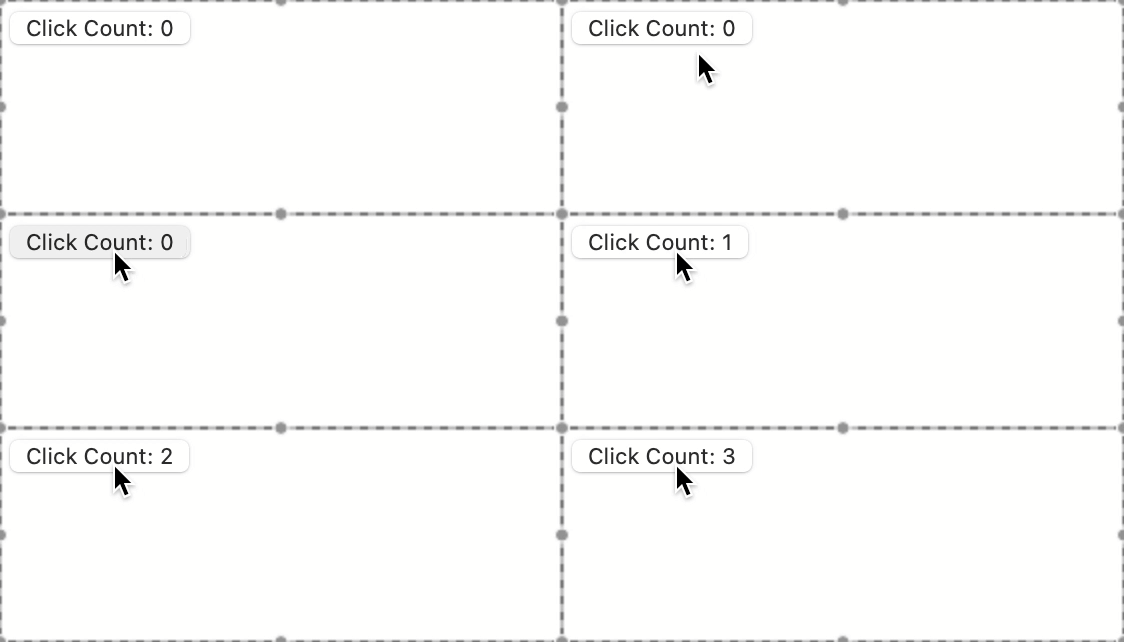
This will result in a button that tells you how many times it’s been clicked:
What’s going on here is:
We use
use_stateto create a state container for the number of clicks whose initial value is 0.use_statereturns a tuple containing the current value and a function that we can use to change the value.We set the onClick attribute of our button element to our increment_click_count() function.
The first time the element renders, the current value for the state is 0, so the button will say “Click Count: 0”.
When the user clicks the button, increment_click_count() is called.
Within the function body of increment_click_count(), set_click_count() is called with click_count + 1 as the new value. click_count was 0, so the new value is 1.
React sets the state value to 1, and then calls MyClientElement’s render function again. This time, the current value is 1, so click_count is 1, so the button will say “Click Count: 1”.
If the user clicks the button again, the current value will again be incremented, and the render function will be called again, resulting in a button that says “Click Count: 2”.
Directly Manipulating Rendered Elements
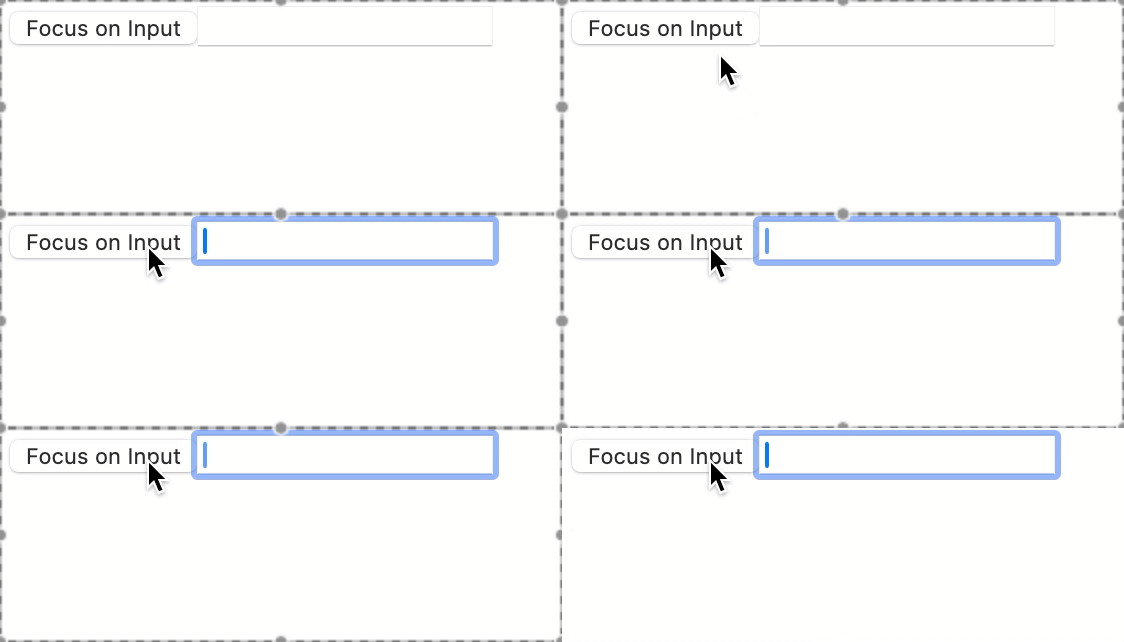
Most of the time, you will be able to get the interactive behavior you want by changing state in response to user interaction. For cases where you need to directly manipulate the DOM, you can use blu.use_ref(). In the example below, we use use_ref to focus an input when the button next to it is clicked.
from blu import client, use_ref
from blu.html import div, button, input

__client__ = True


@client
def MyClientElement():
    input_ref = use_ref()

    def set_focus_to_input(e):
        input_ref[:].focus()

    return div[
        button(onClick=set_focus_to_input)['Focus on Input'],
        input(ref=input_ref),
    ]
What’s happening here is:
- We return a div containing:
A button that will call set_focus_to_input() when clicked, and
An input element whose ref is set to the reference object we created. This causes input_ref’s value to be set to the rendered input element once rendering is complete.
The client element renders the div and its child elements.
Because you passed input_ref as the ref attribute of the input element, the input element that just rendered is set as input_ref’s value.
- If the user clicks the button, set_focus_to_input() will be called. set_focus_to_input() performs the following steps:
Gets the current value of input_ref using
[:](remember that the current value is the rendered input element).Calls the focus() method on that value. Because the current value is a rendered HTML input element, calling its focus() method causes the input element to receive the browser’s focus.
Performing an Action Immediately After Rendering
Sometimes, you’ll want to perform some action immediately after rendering, without waiting for user interaction. For these cases, use blu.use_effect(). For example, maybe we want to trigger an alert modal once the element is rendered:
from blu import client, is_client, use_effect
from blu.html import p

if is_client:
    from js import alert

__client__ = True


@client
def MyClientElement():

    @use_effect
    def send_alert():
        alert(
            'Hello, there! Nothing to report; just wanted to say '
            'hi. Have a nice day!'
        )

    return p['(element content)']

What’s happening here:
On the client side only, we import the alert() function from the js module. The js module is automatically made available in client-side code in Blu apps, and does not need to be installed. It provides access to the global JavaScript scope of the page.
We use
use_effectto tell React to call send_alert() right after rendering.We return a paragraph element that just says “(element content)”.
The client element renders based as the return value of its rendering function, a paragraph element with the text “(element content)”.
Immediately after rendering, send_alert() is called.
send_alert() calls alert() with a message.
This causes an alert modal to pop up in front of the page with the provided message.
The user can then dismiss the alert modal.
Note
use_effect is a special type of function used in React called a hook. There are specific rules you have to follow when using hooks. See Hooks for more details.
Note
If your effect has lingering side effects, make sure you clean up after yourself. To do so, use the yield keyword after your setup code, followed by your cleanup code:
from blu import client, is_client, use_effect, use_state
from blu.html import button

if is_client:
    # The js module provides access to JavaScript APIs. See
    # Blu's API reference for more details.
    from js import alert

__client__ = True


@client
def EffectWithCleanup():
    render_count, set_render_count = use_state(1)

    @use_effect
    def _():
        alert(f'SETUP {render_count}')
        yield
        alert(f'TEARDOWN {render_count}')

    def handle_button_click(e):
        set_render_count(render_count + 1)

    return button(onClick=handle_button_click)["Rerender"]

Accessing Server-Side Resources from the Client
Sometimes you’ll need to access server-side resources after a page has loaded, usually in response to user input. You can do using the @blu.server() decorator, which exposes a server-side function to be called client-side.
from blu import server


@server
def hello():
    print('Hello!')
from blu import client
from blu.html import div

from app.hello_module import hello

__client__ = True


@client
def SayHello():
    return div[hello()]
<div>Hello!</div>
Note
When calling a @server function clientside, all arguments must be JSON-serializable, and the return value must be picklable.
@client
def ClientElement():
    return div[my_server_function(object())]
@server
def my_server_function():
    def my_callable():
        return 1
    return my_callable
class A:
    def __init__(self, value):
        self.value = value


@server
def my_server_function(json_input):
    return A(json_input)


@client
def ClientElement():
    return my_server_function({'Hello': 'World'})